Linear Actuator Calculator
Enter the load, angle, friction and stroke time to get the force, speed and power an actuator needs, and the screw torque.
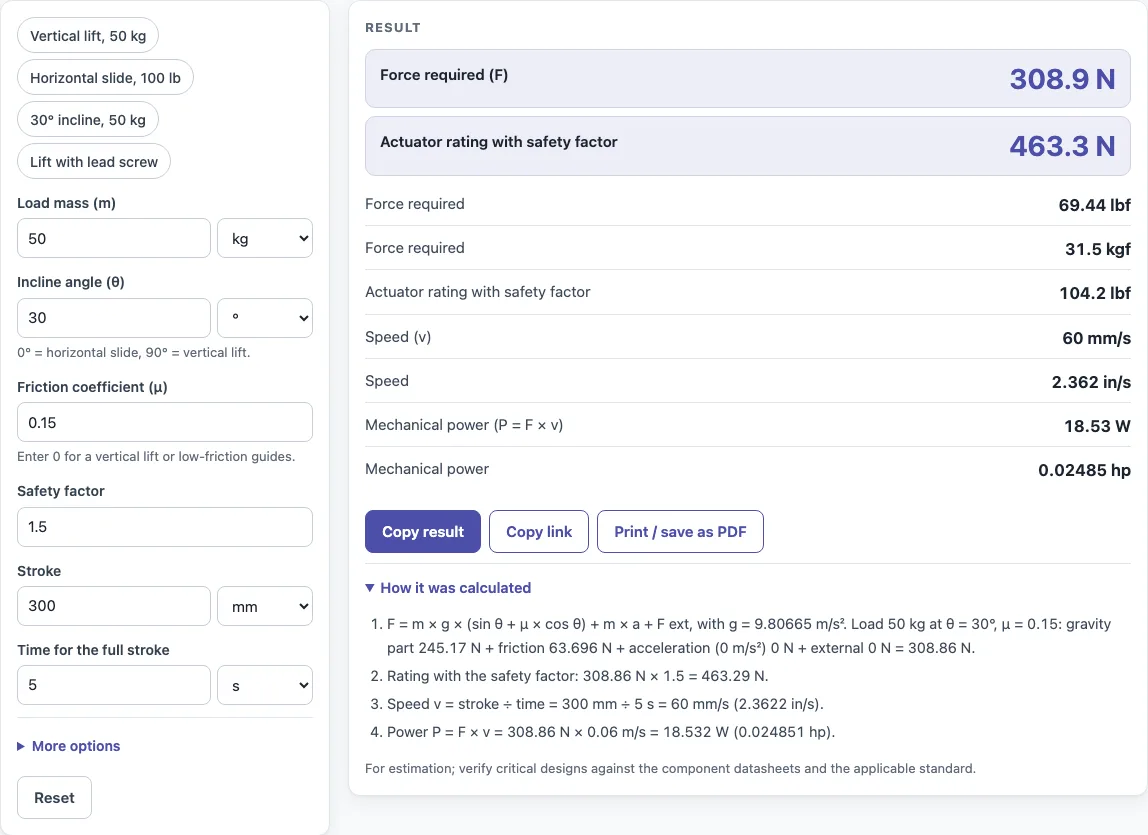
How to use the Linear actuator calculator
- Enter the load mass and its unit.
- Set the incline angle: 0° for a horizontal slide, 90° for vertical lift.
- Enter the friction coefficient μ for the sliding surface or guide.
- Enter the acceleration a if the load speeds up or slows down.
- Enter any external force the actuator must push or pull against.
- Enter the stroke length and the time for the full stroke. The calculator divides stroke by time to find speed.
- Enter your safety factor to get the rated force.
- Optionally, fill in the lead screw fields: lead and efficiency.
- Read the results: force in N, lbf and kgf, rated force, speed, power in W and hp, and screw torque and rpm if you entered lead screw values.
- Open “How it was calculated” to see the formula and each step with your numbers.
Copy result copies the result lines with a link. Copy link copies the page address, which stores every input, so opening it later restores the same calculation. Print / save as PDF prints the inputs, results, calculation steps and the date.
The presets show a 50 kg vertical lift, a 100 lb horizontal slide, a 30° incline and a lift with a lead screw.
How do you calculate linear actuator force?
The force is F = m g (sin θ + μ cos θ) + m a + external force. Here m is the load mass, g is 9.80665 m/s², θ is the incline angle, μ is the friction coefficient, and a is acceleration. The first part covers the load’s weight along the slope plus friction, the second covers the force needed to change its speed, and the third covers any extra push or pull. The rated force is this result multiplied by a safety factor.
How much force to lift a weight vertically?
For vertical lift, θ = 90°, so sin θ = 1 and cos θ = 0. The formula reduces to F = m g. A 50 kg load needs 50 × 9.80665 = 490.3 N, which is 110.2 lbf. Friction drops out at 90° because cos 90° is zero, so μ does not change the lift force. Acceleration and external force are added on top: a 20 kg load accelerating at 2 m/s² with 50 N of extra force needs 286.1 N (64.33 lbf).
How do you size a linear actuator?
Start with the rated force and the speed from the results. Choose an actuator whose rated force is higher than the rated force the calculator shows, and whose speed is at least the speed you need. Speed is the stroke divided by the time for the full stroke. Power is P = F × v, so a 50 kg vertical load moving at 50 mm/s needs 24.5 W. Check the duty cycle, meaning how often and how long the actuator runs, against the actuator maker’s data, because the calculator does not cover it.
How do you calculate lead screw torque?
Use T = F × lead ÷ (2π η), where lead is the travel per screw turn in metres and η is efficiency as a decimal, such as 0.8 for 80%. Screw speed in rpm equals the linear speed divided by the lead. For a 50 kg vertical load at 60 mm/s, the calculator gives a screw torque of 0.9755 N·m, or about 0.98 N·m. Efficiency below 1 increases the torque needed, because some input power is lost to friction in the screw.
How does incline angle change the force?
The incline angle sets how much of the weight pulls along the slope (sin θ) and how much presses into the surface, which creates friction (cos θ). As the angle rises from 0° to 90°, the sin θ term grows and the friction term shrinks. On a 30° slope with μ = 0.15, sin 30° = 0.5 and cos 30° = 0.866, so a 50 kg load needs 308.9 N (69.44 lbf). On a horizontal slide, sin θ is zero, so only friction applies: a 100 lb load with μ = 0.2 needs 20 lbf.
Sources
Checked October 2026:
- Wikipedia, Lead screw for the screw force and torque relations
- NIST, standard gravity g = 9.80665 m/s²
For estimation; verify critical designs against the applicable standard.
Worked examples
| Input | Result |
|---|---|
| 50 kg, 90 °, μ = 0 | F = 490.3 N (110.2 lbf), v = 50 mm/s, P = 24.52 W |
| 50 kg, 30 °, μ = 0.15 | F = 308.9 N (69.44 lbf), v = 60 mm/s, P = 18.53 W |
| 100 lb, 0 °, μ = 0.2 | F = 88.96 N (20 lbf), v = 60.96 mm/s, P = 5.423 W |
| 50 kg, 90 °, μ = 0 | F = 490.3 N (110.2 lbf), v = 60 mm/s, P = 29.42 W, T = 0.9755 N·m |
| 20 kg, 90 °, μ = 0, a = 2 m/s², F ext = 50 N | F = 286.1 N (64.33 lbf) |
Calculated by the tool above with these values.
Frequently asked questions
Why does the result change as I type?
Results are recalculated each time you change an input. This lets you see how a change in load, angle or friction affects force, speed and power right away.
What is the difference between the force and the rated force?
The force is the calculated value needed to move the load. The rated force is that value multiplied by your safety factor, so it is the figure to compare against an actuator’s rated force.
What should I use if I don’t know the friction coefficient?
Setting μ to 0 gives the force with no friction, which is lower than the real force. For a design that needs a dependable margin, use a realistic friction value for your surfaces or guides, and then apply a safety factor.
Can I use the results in commercial work?
Yes. Results may be used in commercial work, including designs, quotes, documentation and reports, without attribution.
Can I enter the load in pounds?
Yes. Mass can be in kg or lb, stroke in mm or inches, and the force is shown in N, lbf and kgf.
Why does a lead screw need more torque at lower efficiency?
T = F × lead ÷ (2π η): with η = 0.3 instead of 0.9 the same force needs three times the torque, because more input power is lost to friction in the screw.
Related tools
- Pneumatic cylinder force calculator: use it to size an air cylinder for the same load.
- Motor torque calculator: use it to check the torque a motor must deliver to drive the actuator or screw.
- Synchronous speed calculator: use it to find the speed of an AC motor that drives the actuator.
- PLC simulator: use it to test control logic for extending and retracting an actuator.
- 4-20 mA calculator: use it to convert analog signal values when an actuator position is sent as a current signal.
- All calculators: use it to browse the full set of tools on this site.