Thermocouple Table and mV Calculator
Convert thermocouple millivolts to temperature and back for any standard type, with cold junction compensation and a printable table.
This free thermocouple table tool lists the voltage a thermocouple produces at each temperature, and converts in both directions between millivolts and temperature for types K, J, T, E, N, R, S and B. It runs in your browser, with no sign-up needed. Use it to build a type K or type J thermocouple table, check a reading, or export a thermocouple chart for a design, quote or report. Results update as you type, so you can change the type, unit or reference temperature and see the new values straight away. It also works on a phone.
The data are the NIST ITS-90 reference functions.
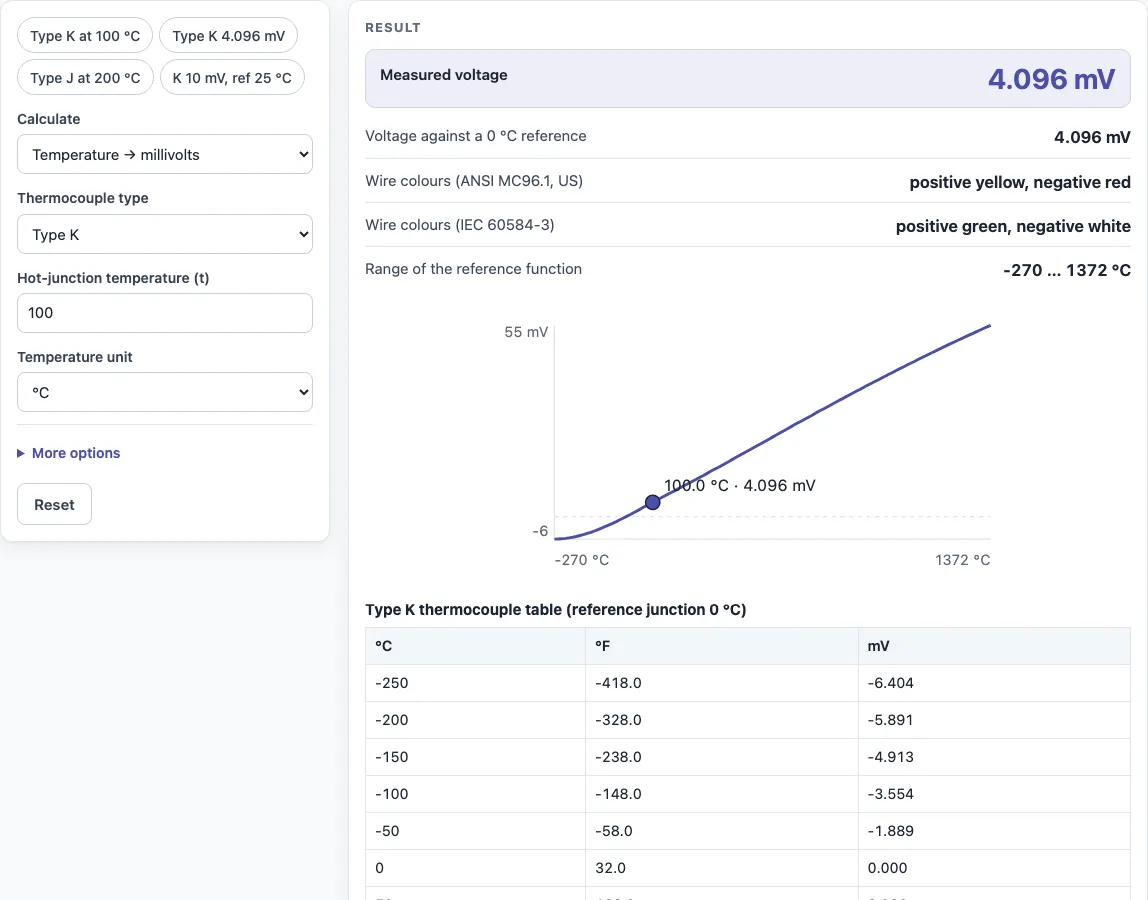
How to use the Thermocouple Table
- Choose the conversion mode: temperature → millivolts, or millivolts → temperature.
- Select the thermocouple type, such as K, J, T, E, N, R, S or B.
- Pick the unit, °C or °F.
- Enter the reference (cold) junction temperature. Leave it empty to use 0 °C, the ice-point reference used in standard tables.
- Type your value in the input field. The result updates as you type.
- To build a full table, set the step and range for the chosen type. The table shows the voltage and temperature at each row.
- Look at the curve drawing to see how voltage changes with temperature.
- Open “How it was calculated” to see the formula and each step with your numbers.
Use Copy result to copy the result lines with a link. Copy link copies the page address, which stores every input, so opening it later restores the same calculation. Print / save as PDF prints the inputs, results, calculation steps and the date.
The presets show type K at 100 °C, a type K reading of 4.096 mV, type J at 200 °C and a 10 mV type K reading with the reference junction at 25 °C. Set the table step and range, then print the table with Print / save as PDF.
How do you convert thermocouple millivolts to temperature?
You cannot divide the millivolts by a fixed factor, because the voltage is not linear in temperature. The tool uses the full NIST ITS-90 polynomials and solves them numerically for the temperature. For example, a type K reading of 4.096 mV gives 99.994 °C.
What is the mV output of a type K thermocouple?
A type K thermocouple produces about 4.096 mV at 100 °C and about 20.644 mV at 500 °C, measured against a 0 °C reference. The output rises with temperature but not in a straight line. Enter any temperature in the tool to get its exact value.
What is cold junction compensation?
A thermocouple measures the difference between its hot junction and its reference (cold) junction, not the absolute temperature. The tool corrects for this with the formula measured voltage = E(t) − E(t_ref), where E is the reference function for the type. If your reference junction is at 25 °C, enter 25. For example, a type T reading of 3.5 mV with the reference at 25 °C gives 104.55 °C.
What are the thermocouple color codes?
In the US (ANSI MC96.1), the type K pair is yellow/red, type J is white/red, type T is blue/red, type E is purple/red and type N is orange/red. In US practice the red wire is always the negative leg. Under IEC 60584-3, the positive leg is green for K, black for J, brown for T, violet for E, pink for N, and orange for R and S, with a white negative leg. No IEC colour code is established for type B.
What is the difference between type K and type J?
Type K is a general-purpose thermocouple. Type J is typically used with older equipment and in reducing atmospheres. The two types produce different voltages at the same temperature. For instance, type J gives 10.779 mV at 200 °C (392 °F). Enter both types in the tool to compare their outputs at your working temperature.
Why is a thermocouple table referenced to 0 °C?
The ice point (0 °C) is a stable, easily reproduced reference that anyone can create. Tables set the reference at 0 °C so that every table uses the same baseline. Other reference temperatures are handled by adding or subtracting the reference function, as described above.
Sources
Checked October 2026:
- NIST ITS-90 Thermocouple Database (coefficients): all 8 types and 12,033 table points match within rounding
- WIKA international thermocouple colour chart and TC Direct colour codes for ANSI MC96.1 and IEC 60584-3 colours (none established for type B)
For estimation; verify critical designs against the applicable standard.
Worked examples
| Input | Result |
|---|---|
| Type K, 100 °C | 4.0962 mV |
| Type K, 500 °C | 20.644 mV |
| Type J, 392 °F | 10.779 mV |
| Type K, 4.096 mV | 99.994 °C |
| Type T, 3.5 mV, reference 25 °C | 104.55 °C |
Calculated by the tool above with these values.
Frequently asked questions
Is a thermocouple chart the same as a thermocouple table?
They show the same data, voltage against temperature for one thermocouple type. The tool builds a table with an adjustable step and range, and it also draws the curve, so you can use either form.
Can I use the results in commercial work?
Yes. Results may be used in designs, quotes, documentation and reports without attribution.
Do I need an account or to upload anything?
No. The tool is free, requires no sign-up, and runs entirely in your browser, so nothing is uploaded.
What does the tool warn about for type B?
Type B produces almost no voltage at low temperatures: about 0.002 mV at 50 °C and 0.033 mV at 100 °C in the NIST table. The tool shows a warning when the type B hot junction is below 100 °C.
Which thermocouple type has the highest output?
Type E produces the most voltage per degree of the common types (21.04 mV at 300 °C), which is why it is used where resolution matters.
Can I use the table in °F?
Yes. Choose °F as the temperature unit; type J at 392 °F gives 10.779 mV.
Why does my thermocouple read wrong with copper extension wire?
Every junction of different metals makes its own voltage; use extension wire of the matching thermocouple type so the reference junction is at the instrument, where it is compensated.
Related tools
- PT100 table: use this when you need resistance-to-temperature values from an RTD instead of thermocouple voltages.
- 4-20 mA calculator: use this to convert between current signals and process values once your sensor output is scaled.
- PLC simulator: use this to test control logic that reads a temperature input before connecting real hardware.
- All calculators: use this to browse every free calculator on the site.